How much memory does a local LLM need? RAM, VRAM and context
Neaptide · September 20, 2026 · 10 min read · Updated: October 4, 2026
Estimate local LLM memory: weights, quantization, KV cache, RAM and VRAM, with formulas and a practical measurement procedure.
On this page
The model file is 4 GB, the machine has 8 GB of free memory, and it still will not run. Weights are only the start of the calculation. Account separately for the KV cache, working buffers and other applications, then test your workload in the runtime you will actually use.
Before choosing a computer, write down the exact model and quantization, the context length you need and the number of concurrent requests. Explaining a short function and analysing several large files put different demands on the same model. With those details you can estimate memory, then check the estimate with a trial run.
What uses memory
| Component | What determines it |
|---|---|
| Model weights | Parameter count and storage format |
| KV cache | Architecture, context, cache precision and sequence count |
| Working buffers | Inference engine and launch settings |
| Other applications | Operating system, editor, browser and background processes |
The KV cache stores intermediate attention data so that it does not all have to be recalculated for every generated token. How the cache is managed affects memory use.
In practice, the same model may need considerably more memory with a long context than with a short one.
Do not paper over the unknown parts of the budget with an invented “20% for everything else”. Measure memory before loading, after loading and during a request at the required context length. Those three points show where usage grows, although they will not break it down into every internal runtime buffer.

Estimate weight memory
A first approximation is:
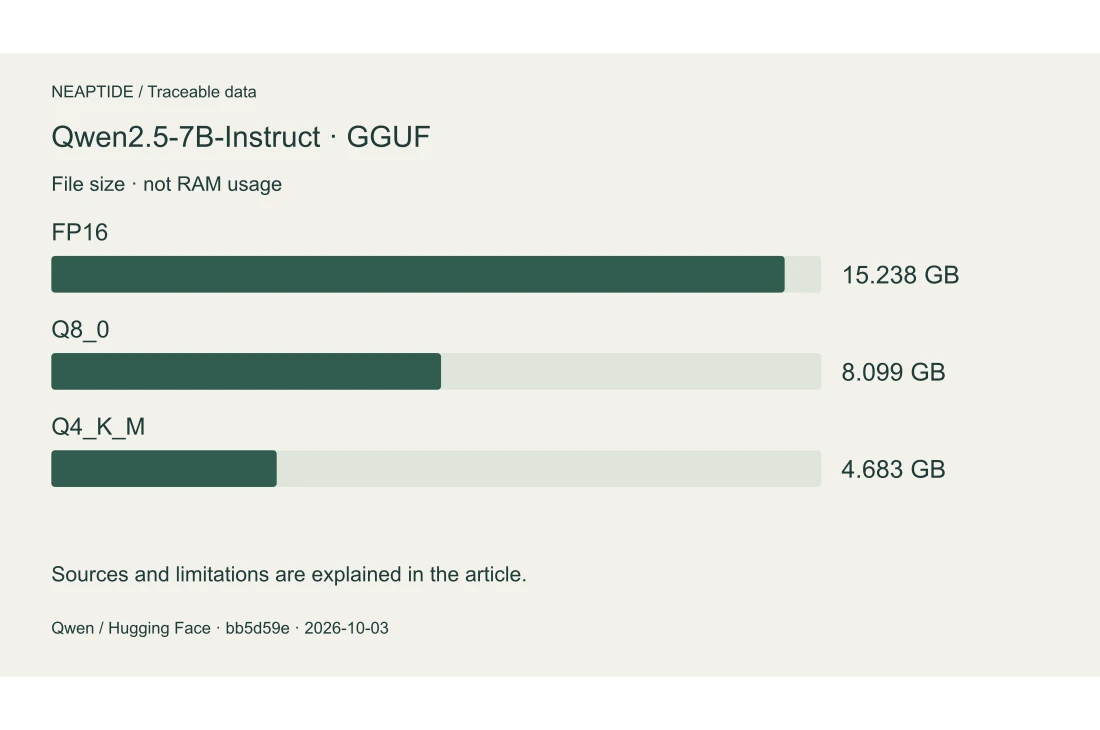
weight bytes ≈ parameter count × bits per parameter / 8Use actual Qwen2.5-7B-Instruct-GGUF files from Qwen’s official repository. On 3 October 2026 we retrieved file metadata through the Hugging Face API and summed every shard for each format, at revision bb5d59e06d9551d752d08b292a50eb208b07ab1f. We did not download the weights or run the model.
| Format | Shards | Total bytes | GB |
|---|---|---|---|
| FP16 | 4 | 15 237 853 536 | 15.238 |
| Q8_0 | 3 | 8 098 525 408 | 8.099 |
| Q4_K_M | 2 | 4 683 073 632 | 4.683 |
Q4_K_M does not mean exactly four bits for every parameter. These file sizes include packing, metadata and tensors stored at different precisions. The Q4_K_M files total 4.683 GB, rather than the 3.5 GB obtained from a rough seven-billion-parameter calculation.
Divide bytes by 1,073,741,824 for GiB or by 1,000,000,000 for GB. File size is not RAM or VRAM consumption: KV cache, working buffers and other applications also need memory.
FP16, Q8_0 and Q4_K_M refer to the same model and revision. Shard count describes the download layout, not multiple models: you need every shard of the chosen format.
RAM versus VRAM
RAM is system memory; VRAM is the memory on a discrete GPU. Where the model ends up depends on the hardware and the inference engine. In unified-memory systems the CPU and GPU share one pool, and the operating system needs part of it too.
You cannot simply add 16 GB of RAM to 8 GB of VRAM and treat the result as a 24 GB graphics card. Whether the work can be split, and what moving data back and forth costs, depends on the particular setup.
In Ollama, ollama ps shows how a loaded model is placed between CPU and GPU.
How context affects memory
For a conventional full KV cache, a rough estimate is:
cache bytes ≈ 2 × layers × KV heads × head dimension
              × tokens × bytes per element × sequences
The factor of two accounts for keys and values. The formula is a simplified model for the architectures it fits, not a universal LLM calculator. Sliding attention, compression and other implementations change the calculation.
So compare configurations at the same configured context. If one model is given a short function and another an entire repository, the difference in memory proves very little by itself.
Ollama lets you change the context length; a longer context needs more memory. Check current placement and context with ollama ps.
Take an illustrative architecture: 32 layers, 8 KV heads, head dimension 128 and 2 bytes per cache element. A full cache for one 4,096-token sequence needs 0.5 GiB; at 16,384 tokens it needs 2 GiB. Four such sequences come to 8 GiB of cache. In the calculator below the weights are shared, while the cache grows with context and concurrency.

How context changes memory use
Illustrative model: 7B, 4-bit weights; full KV cache: 32 layers, 8 KV heads, head dimension 128, 2 bytes per element. All sequences share the weights.
- Raw weights
- 3.26 GiB
- KV cache
- 0.5 GiB
- Weights + cache
- 3.76 GiB
Excludes the OS, runtime buffers and quantization metadata. This does not predict total RAM or VRAM usage. Other architectures need a different calculation.
Change context or concurrency: the weight size stays the same.
Test your computer
Record the model, exact tag, quantization, engine and engine version. Run the same task with a short input and a longer one. Save:
- Configured context and concurrent request count.
- Memory use before and during execution.
- CPU/GPU placement.
- Time to the first response and total duration.
- Result quality against predefined requirements.
Repeat the run to tell model loading apart from steady operation. If memory runs out, reduce one parameter first. Do not change the model, the context and every setting at once.
What to try with 16 or 32 GB
No list of guaranteed configurations holds regardless of hardware. With limited memory, start with a small quantized model and a short task, as in the Ollama guide. Leave room for the system and your applications.
Choose a configuration for your own workload: enough context, an acceptable response time and no memory exhaustion on repeated runs. Save the model tag and the measurement settings. A memory or GPU purchase then answers a constraint you have observed, not the size of a model file.
Sources and verification
Technical sources and calculations checked on October 3, 2026. Scenarios and diagrams are illustrative Neaptide examples; no comparative product benchmarks were performed.