Build a business website with AI: from the brief to testing enquiries
Neaptide · September 6, 2026 · 9 min read · Updated: October 3, 2026
Build a pottery studio website, check the layout and test the enquiry form. Includes original screenshots, a working demo, publishing steps and SEO basics.
On this page

A visitor picks a workshop, enters an email address and clicks Submit. The page says ‘Thank you’, but the studio receives nothing. The site looks finished and fails at the one thing it is there to do. So start an AI website project by naming the action a visitor has to complete, and how you will know it worked.
For a small business site the order is short. Gather the facts and describe one main visitor task. Build the page, check a narrow layout, test the form. Publish it, then repeat those checks at the public URL. An agent can help write and change code, but someone still has to own the business terms and the acceptance checks.
The example we built
Forma is a fictional pottery studio. We built an offer, a short workshop programme and a practice form, reusing the image from our previous guide. The €60 price and all workshop terms are invented. The five illustrations are screenshots of the working example. Its server validates synthetic requests but does not save them or send email, and it accepts only @example.com addresses.
1. Gather facts before asking for a design
“Make a modern website” leaves every business detail for the agent to guess. Write down who the workshop is for, what participants will make, what the fee includes and when they can collect their work. Save confirmed facts in a project file and mark the gaps, then tell the model plainly that it must not fill them with an invented address, reviews or years of experience.
2. Choose how the site will be maintained
If staff need to edit the page regularly without touching code, decide on an editor or CMS early. A small custom site can also work as a code project with a clear publishing process. Whoever looks after the site once it is live matters as much to that choice as the first build.
Open a project folder in an agent that can work with files. Before it builds anything, ask for a page outline and a list of what it still needs to know. Our Codex guide covers getting started, and the brief below lets you repeat this exercise.
Build a teaching website for a fictional pottery studio called Forma.
A two-hour beginner workshop costs €60 per person, for up to 8 people. Materials and firing are included. Label these terms as fictional.
Include an offer and CTA, three programme steps and a form. Do not invent reviews, an address or performance figures. Use the existing project image. Stack text and image on narrow screens.
The form accepts a practice @example.com email and 1–8 participants. Validate in the browser and on the server. Do not store requests or send email, and say so in the result.
Include a simulated server failure. Keep the fields filled after errors and allow a retry.
First identify the files you would change and propose the acceptance checks.
3. Read the first screen as a visitor
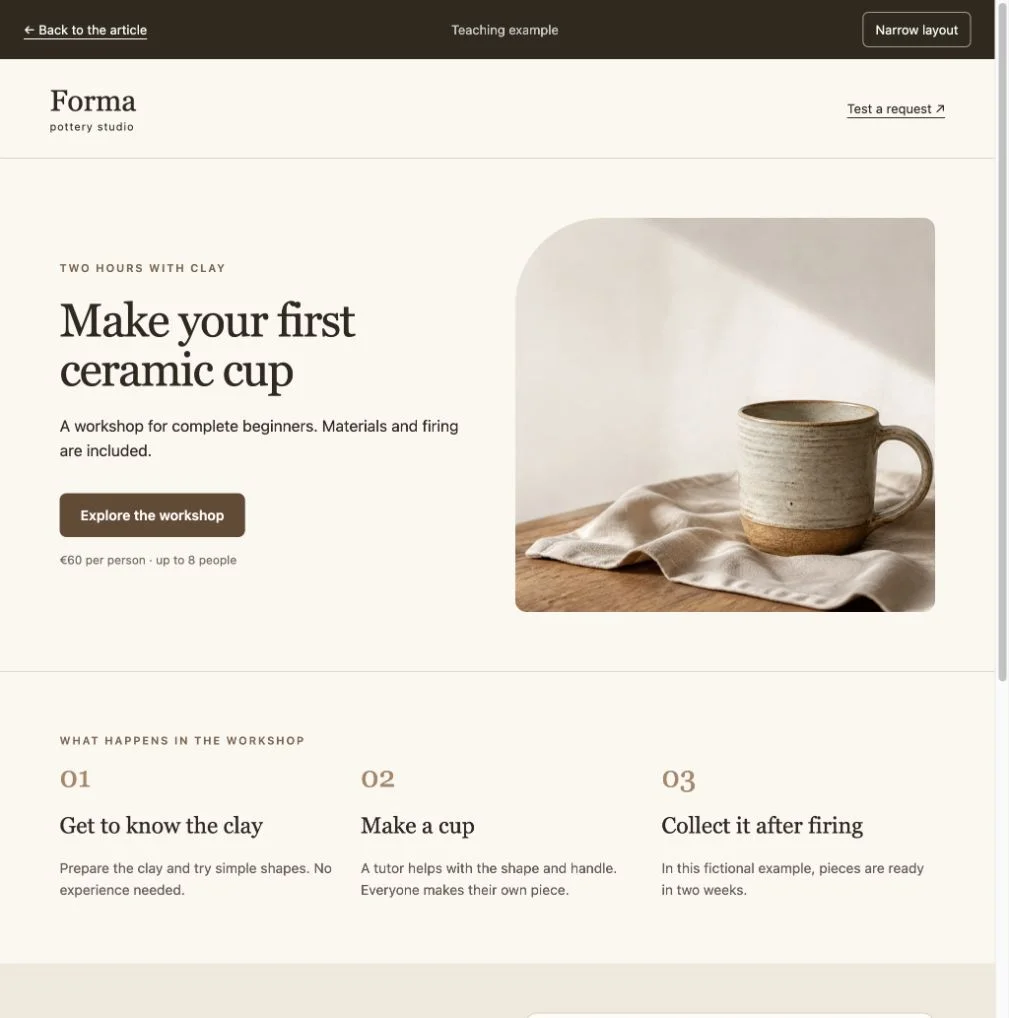
A visitor should be able to tell what the activity is, what it costs and what the price includes. Click the main button and make sure it lands on the section you meant. In our example the image sits beside the text, so the heading can be edited without generating a new picture.
Ask for specific changes. ‘Shorten this to two sentences, preserving the materials information’ gives the agent something to act on, which ‘make it better’ does not. Save a working version after each meaningful change so the next edit can be undone.
4. Check a narrow layout
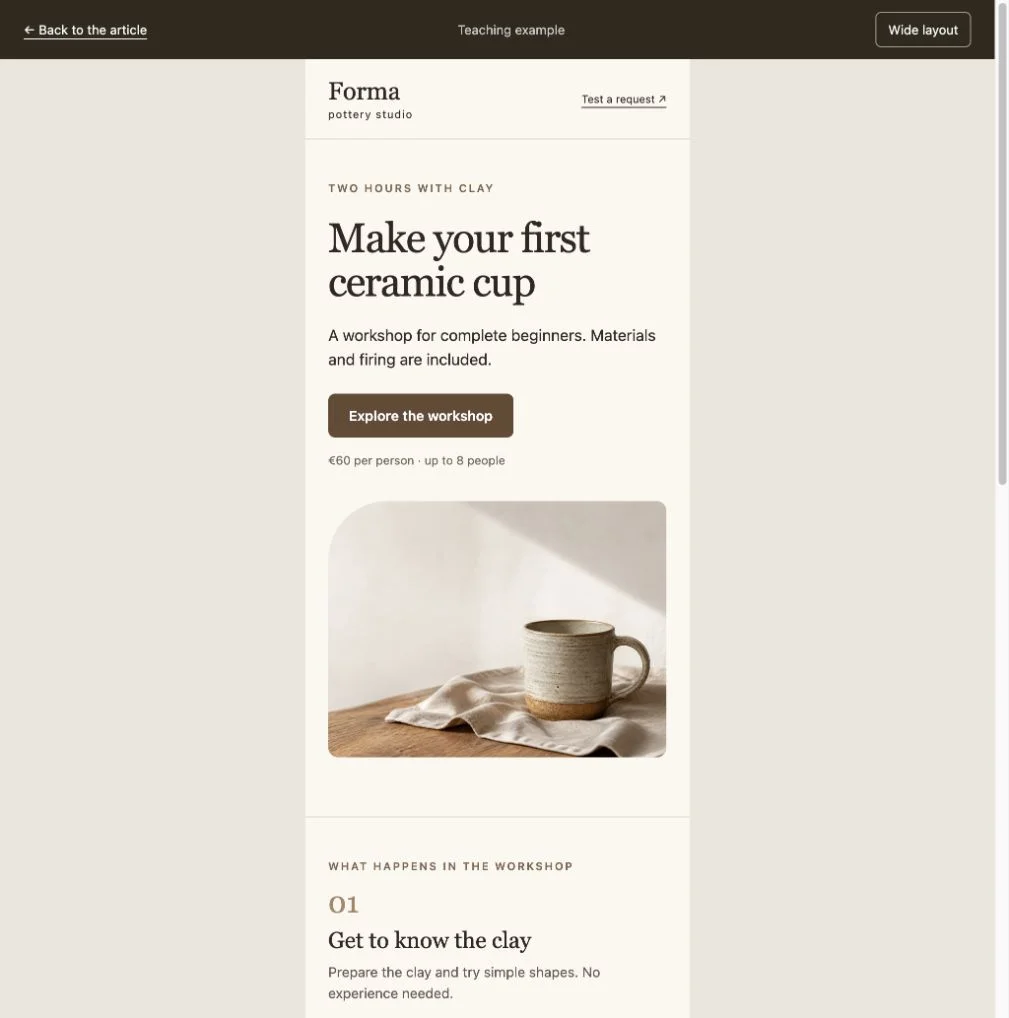
The columns become a single stack and the heading stays clear of the cup. Before a real launch, also open the page on a phone, bring up the keyboard, complete the fields and reach the submit button. A narrow desktop preview checks only part of that experience.
Check wide and narrow layouts for horizontal overflow, clipped text and overlapping elements. Follow links and complete the form using the keyboard. Fix one issue at a time and repeat the affected check.5. Test three form states
Invalid input
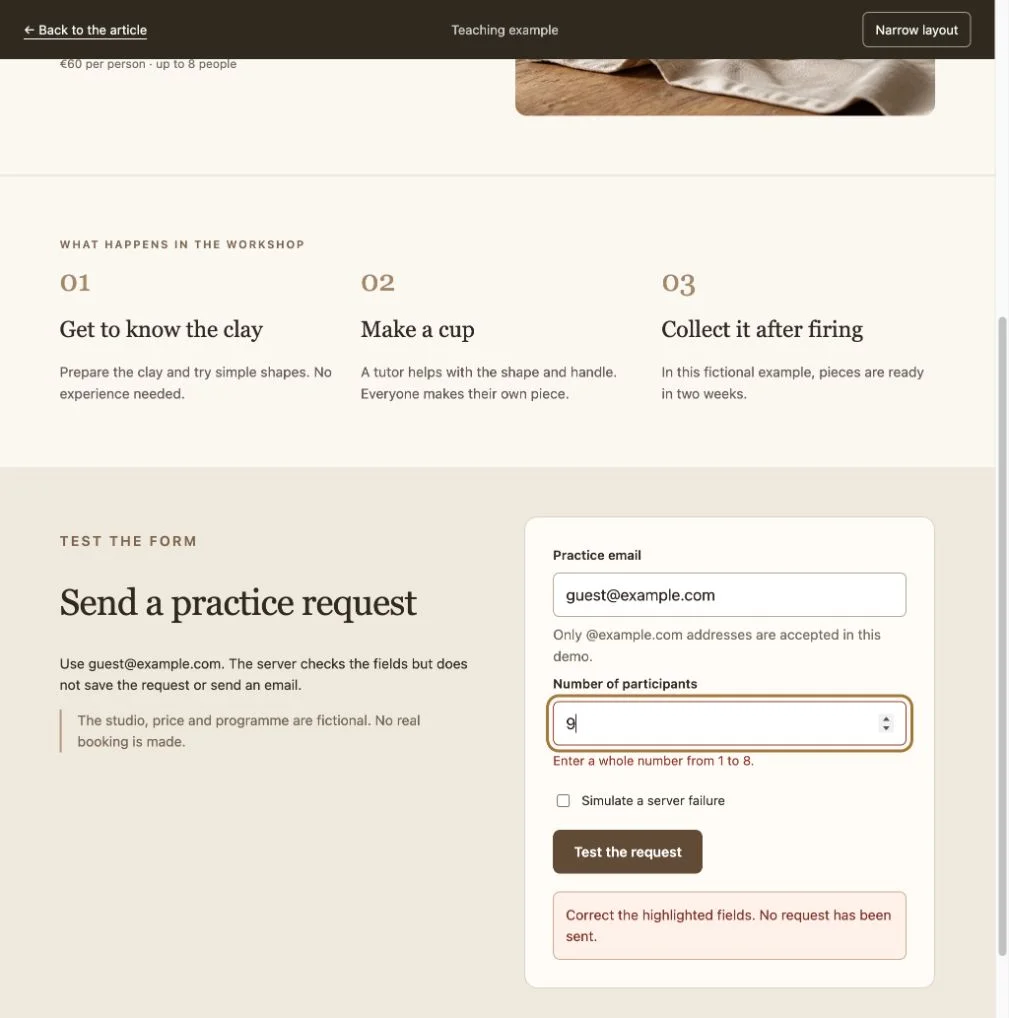
Enter 9 participants. The form should explain the 1–8 limit next to the field, focus the error and leave the request unsent. Browser validation helps the visitor. The server has to validate as well, because a request can bypass the interface altogether.
Server failure
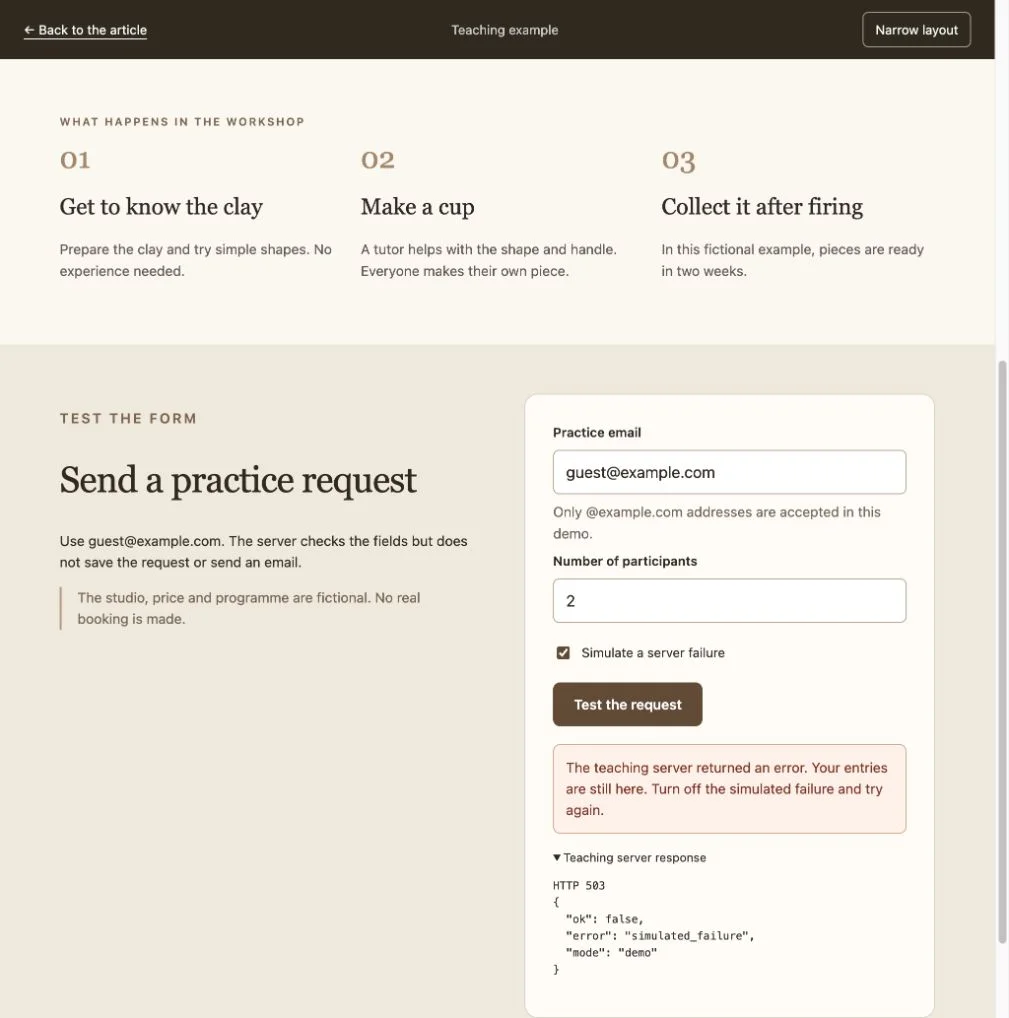
Change the number to 2 and enable the simulated failure. The endpoint returns HTTP 503. The page should report an error, keep the inputs and allow another attempt. Turn the failure off and retry.
Confirmation
A valid request receives HTTP 200 with an explicit result: validated, not stored, not forwarded. The page shows the visitor exactly that. While a request is running, the submit button is disabled.
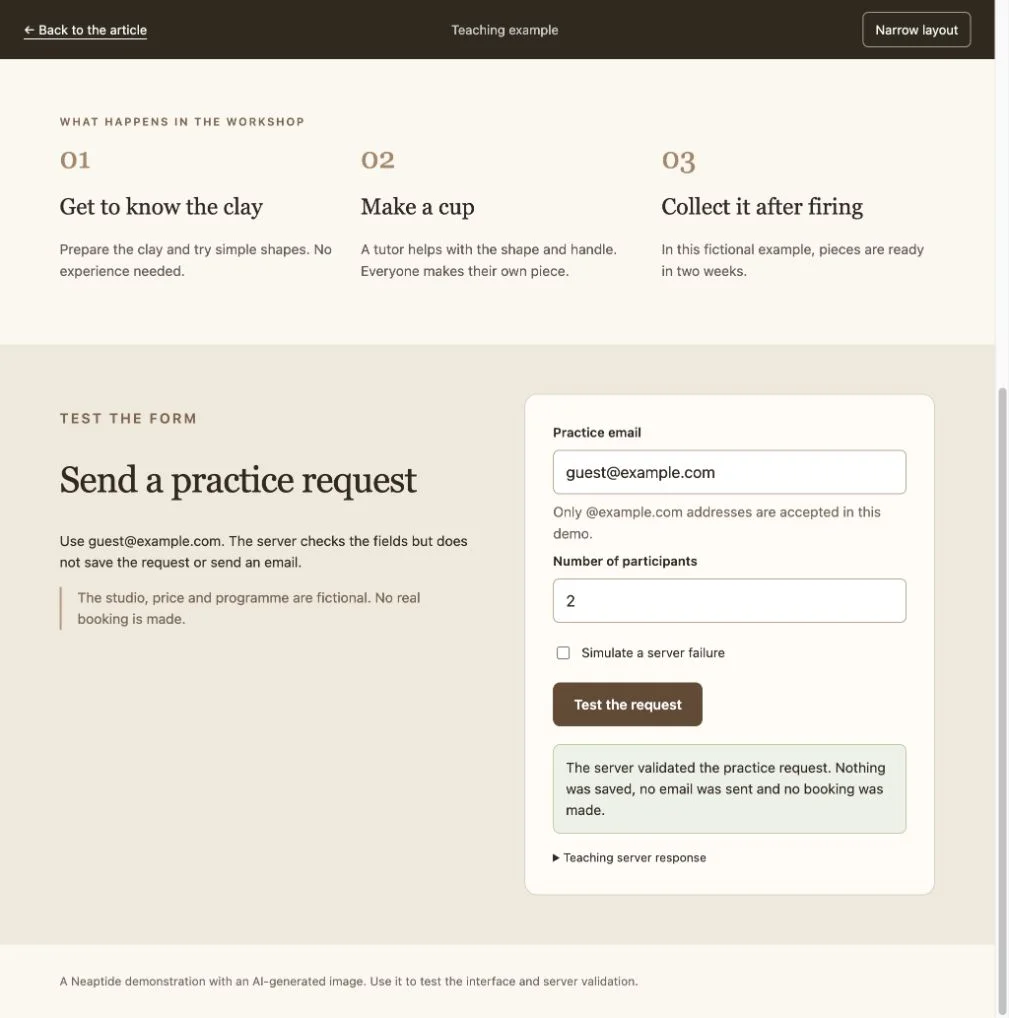
For a commercial site, decide where the enquiry belongs: a CRM, a booking system or an inbox. Send a test and find it there. A mail service that has accepted a message into its queue has not yet delivered it. If retries create duplicate records, add server-side handling for repeat submissions.
The example passed 12 endpoint checks covering valid data, invalid email and counts, unsupported input, an oversized body and simulated failure. That tests the demo’s logic. It is no substitute for a load test or an audit of a real booking system.
6. Publish and test the public address
The code repository stores the project and its version history, and the hosting service builds the website and puts it online. This project uses GitHub for the repository and Vercel for hosting. You do not always need a separate virtual private server (VPS). You do need a host that can run the code that processes the form.
- Save a working version and connect the repository to the host.
- Check build settings and environment configuration. Keep integration secrets out of public page code.
- Test a preview deployment: links, validation, failure and confirmation.
- Connect the domain using the host’s instructions and verify HTTPS.
- Repeat the checks on the public URL and confirm receipt at the actual destination.
Budget for the build, the AI tool, the domain, hosting, form services and maintenance. The AI subscription is one line in that list.
7. Make the offer understandable to search and AI systems
Write a clear page title, description and main heading. Answer who the service is for, what the price includes and what happens after an enquiry. Anything important should appear as text, even when an image shows it too. On multilingual pages, check that each language has its own URL and that the language links work. Structured data must agree with the visible content.
Direct answers and explicit conditions help people understand and quote the offer. They do not guarantee a place in search results or AI answers. The teaching demo is marked noindex, while this article is meant to be found in search.
When to bring in a specialist
- Payments, accounts or bookings with limited availability are involved.
- You cannot trace the request from the form to its destination.
- An existing site needs moving without losing URLs and search traffic.
- Changes repeatedly break neighbouring features.
Bring the actual scenario, confirmed requirements and test results. For a real studio, the enquiry flow is not finished until the responsible person can find a correct request in the working system.