Website CRM integration: check that every enquiry arrives
Neaptide · September 7, 2026 · 6 min read · Updated: October 3, 2026
Connect website forms to your CRM, preserve attribution and handle retries without duplicate enquiries. Includes a failure scenario and acceptance checklist.
On this page

A thank-you message does not prove that an enquiry reached your CRM. Before you sign off the website, ask to see three things: the saved submission, its CRM record and the owner assigned to it. And if processing stops somewhere between those stages, someone needs to be able to see where.
The integration sends website form data to the CRM, creates an enquiry, links it to a contact and assigns a salesperson according to your rules. Sometimes the CRM’s own form or a ready-made connector is enough for that, and sometimes it takes custom API development. Which one you need depends on how your enquiries have to be handled.
Define what “received” means
There are three separate milestones here. The website saved the enquiry, the CRM confirmed the record, and a salesperson received a task. An email or Telegram notification is useful, but it does not show that all three happened.
During a CRM outage the website can safely store an enquiry for later delivery and tell the visitor it has been received. If storage fails as well, a success message would be misleading, so offer a clear retry or another way to get in touch. As for response times, promise only what the sales team has agreed to meet.
Start with the simplest suitable connection
First check whether a native form or an existing connector carries the fields you need, routes enquiries to the right people and recovers after an error. Ask to see that on test enquiries. Custom code is not more reliable just because it is custom.
A queue separates intake from processing, but someone has to watch the delayed and failed messages. For a small, steady flow of enquiries a separate queue service may add little. When you weigh it up, count the running effort as well as the initial setup.
Decide which enquiry details the CRM needs
Draw up a table showing each form field and where it goes in the CRM. Add the details the site supplies itself, such as the page address, form ID, submission time and known traffic source. Then check which CRM fields are required and what values they accept, because free text from the website may not fit a fixed dropdown.
Decide whether to retain the first known source, the current enquiry’s source or both. Missing UTM parameters do not mean the visit was direct. The source may simply be unknown.
CRM credentials stay on the server. Decide who can view diagnostic records as well, or the error logs will turn into copies of customer messages that anyone can open.
A retry is different from a returning customer
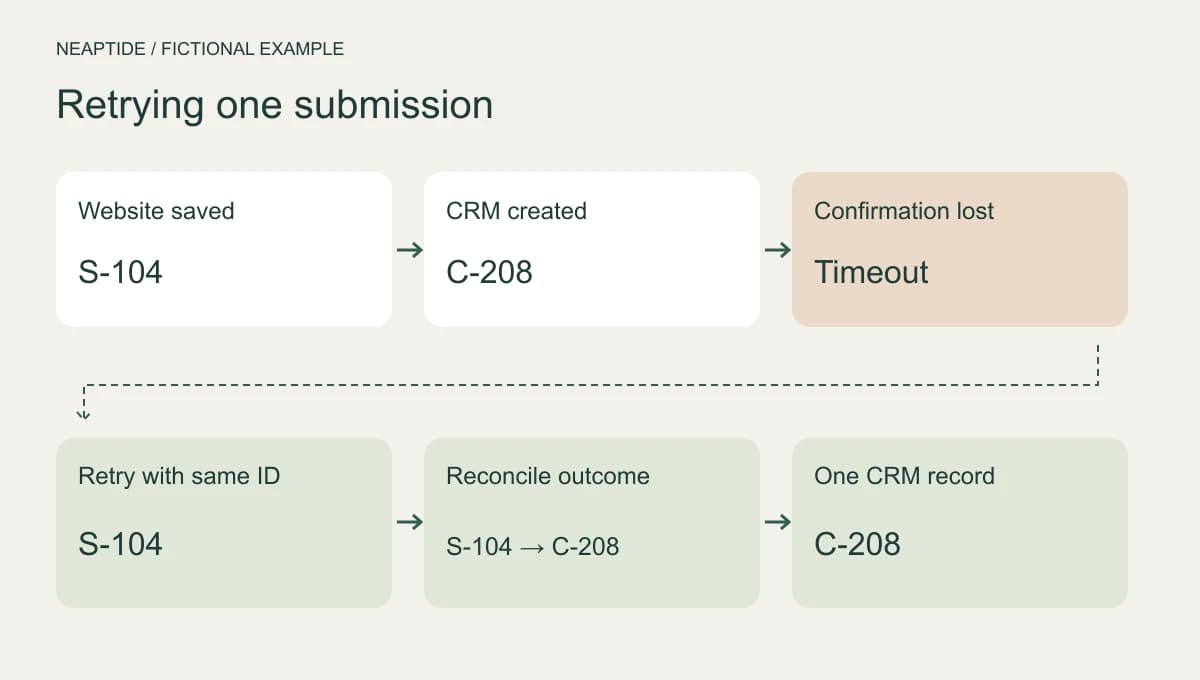
Take a fictional submission, S-104. The CRM creates record C-208 for it, but the confirmation never reaches the website, which sees only a timeout. If the website now creates the record again without checking the outcome, you can end up with a duplicate.
Use the same submission ID when retrying delivery. If the CRM API supports idempotency, repeated requests are treated as one action. If it does not, someone has to design a way to match and check records. Searching before you create a record is not enough, because two requests can arrive together. And a timeout does not tell you whether the first record was saved.
Suppose the same person requests a different service the next day. That is a new enquiry, S-105. Link it to the existing contact if you like, but keep the new request as the sales team’s rules require. Delete every submission with a repeated phone number and you lose real enquiries.
Ask to see a failure test
Run these cases in a test environment for every form and every language version. They describe expected behaviour and are not test results from any particular CRM. Note the submission ID next to each observation, so that you are comparing the same enquiry across systems.
| Test case | Expected check |
|---|---|
| Normal enquiry | Correct fields, source, record and owner. |
| Temporary CRM outage | Saved enquiry, visible pending state and resumed delivery. |
| Timeout after creation | Retry produces no second enquiry; reconcile using the ID. |
| Invalid required field | Visible error; no endless retries without correction. |
| New request, same phone | New request preserved according to agreed rules. |
| No UTM parameters | Unknown source is not replaced with an invented campaign. |
Agree the handover before launch
At handover, ask for the field-mapping table, the rules for repeat enquiries and instructions for finding and handling errors. Someone has to be named as responsible for failures, and acceptable delivery times should be agreed. It is also worth having the developer show how to resume processing after a fix without creating duplicates.
The number of new deals will not necessarily match the number of enquiries, because some enquiries are added to existing contacts or deals. So check each submission ID against its delivery status, allowing for tests, spam and pending requests. A recorded click on Submit does not prove that the enquiry arrived.
For a Neaptide website project, send the website address, CRM name, form list and a sanitised example of the desired record. Explain how returning customers should be handled and who in sales will accept the work.